

Credit limit reached
Every ChatNorris plan includes a monthly bucket of AI credits (not a fixed number of messages — each model consumes a different number of credits per reply, see AI models and credits). When that bucket runs out, the agent stops replying until the counter resets or you move to a higher plan.How do I know if I reached the limit?
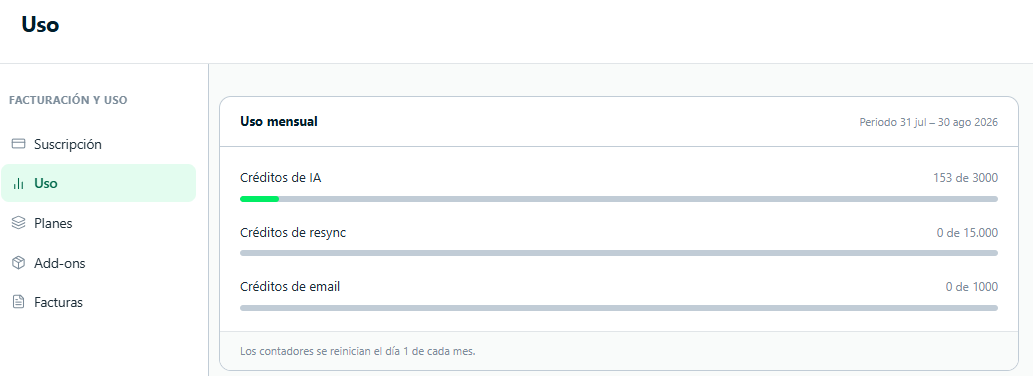
- Visitors in the widget see a message saying the agent is temporarily unavailable.
- WhatsApp, Instagram, Telegram or Messenger messages go unanswered.
- AI credits in Usage → Summary are at 100%.
Options to fix the problem
- Wait for the monthly reset
- Add extra credits without changing plans
- Move to a higher plan
Counters reset automatically on the first day of each month. If you’re close to the end of the month, waiting a few days may be enough.
The reset happens at 00:00 UTC on the first day of the month.
What consumes AI credits?
Every reply generated by the agent consumes credits, in an amount that depends on the AI model configured for that agent (see the cost table in AI models and credits). Specifically:- Bot replies to visitor messages (web, WhatsApp, Instagram, Telegram, Messenger, Email, API v2).
- Draft replies to Google reviews, including Regenerate. Publishing the reply doesn’t consume credits.
- Messages sent manually by a human agent do not consume credits.
- Testing the agent from Playground doesn’t consume credits either.
Can I see how fast I’m using credits?
Yes. In Analytics → AI performance you see the credits consumed per day with a projection for the month, and in Billing & usage → Usage → AI credits the breakdown by day, agent, model and channel. This helps you estimate when you might reach the limit and which agent accounts for most of the spending.Frequently asked questions
Does the limit apply per agent or to the whole account?
Does the limit apply per agent or to the whole account?
The plan’s credit bucket is per organization (your whole account), not per individual agent — all your agents share the same monthly counter. Optionally, you can also set a credit cap of its own for a specific agent from My agents → [agent] → Settings → Limits, to split usage between agents without touching the account’s overall limit.
Do campaign messages count toward the limit?
Do campaign messages count toward the limit?
Campaigns don’t consume AI credits. Emails in an email campaign do deduct 1 email credit per successful send, from the same bucket as the Email channel and the Send Email action.
Can I buy additional credits without changing plans?
Can I buy additional credits without changing plans?
Yes. The Extra credits (1K) add-on adds 1,000 AI credits per month per unit, without having to change plans — you can request several units. You request it from Usage → Summary and the ChatNorris team activates it. See Add-ons.
What happens to messages that weren't answered while I was at the limit?
What happens to messages that weren't answered while I was at the limit?
Messages that arrived while the bot was disabled because of the limit aren’t recovered or answered retroactively. If the visitor needs help, they have to write again once the service is active.