

Billing and payments
From Billing & usage you can see your current plan, this month’s usage and the options to upgrade to a higher plan.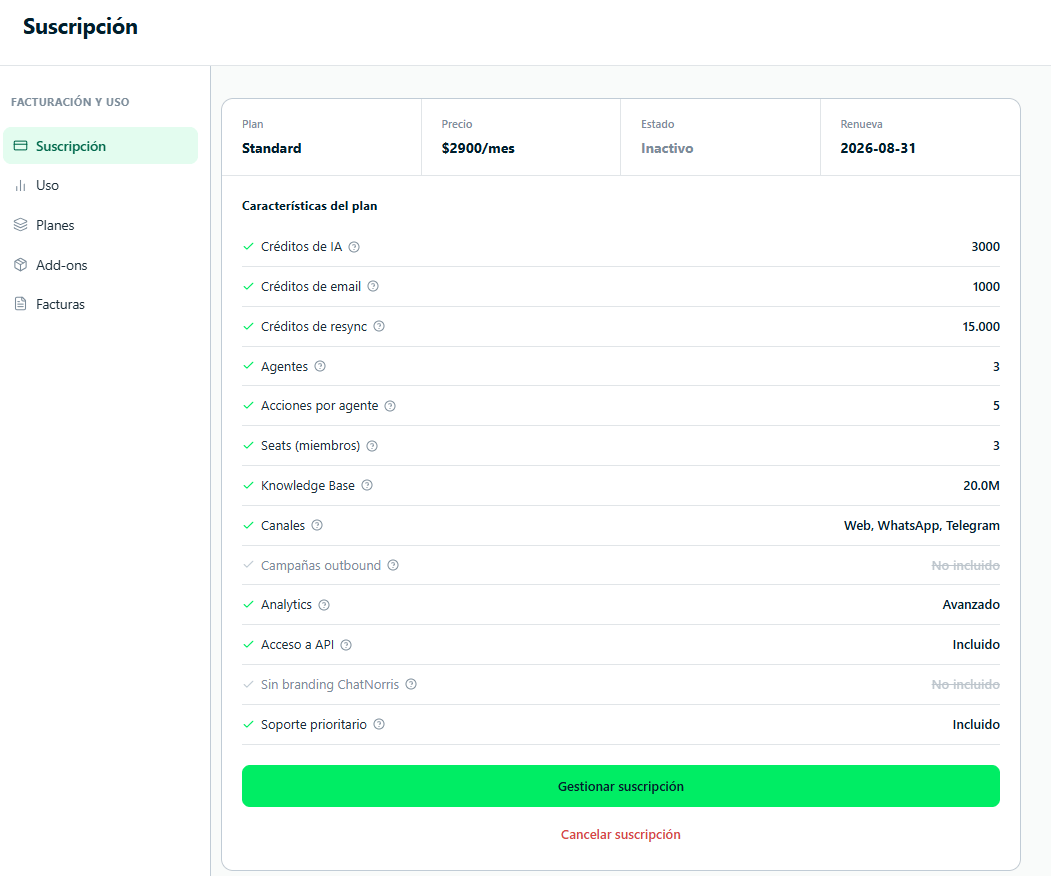
Available plans
- Free
- Standard
Ideal for exploring the platform and running tests. Free of charge, no credit card.Includes:
- 1 AI agent
- 300 AI credits per month
- 25 email credits per month
- 500,000 Knowledge Base characters
- Web (widget) and Telegram channels
- Cal.com Action — Scheduling
- Claude and GPT AI models — see AI models and credits
- Basic analytics
- Email support
The exact limits of each plan (credits, agents, KB characters, seats, channels, integrations and AI models) are shown in the portal under Billing & usage → Plans and at chatnorris.ai/pricing. Both come from the same plan configuration, so they always show the current values.
Campaigns is in a pilot stage: even if your plan includes it, ChatNorris has to enable it explicitly for your organization before it shows up in the menu or works. If you don’t see it available, write to us at hola@chatnorris.ai.
Billing cycles: monthly and annual
All paid plans are available in two cycles:
To choose the cycle, use the Monthly / Annual toggle on the plans page before activating.
On the public pricing page (chatnorris.ai/pricing) you can see approximate prices in your local currency (CLP, COP, PEN, MXN, BRL or EUR) with the USD / local currency selector. It’s only a reference with a fixed exchange rate: you’re always charged in US dollars (USD).
Activate or change your plan
The process is fully self-service — you don’t need to write to the team:1
Go to Billing & usage → Plans
In the portal’s side menu, click Billing & usage and then Plans.
2
Choose the billing cycle
Use the Monthly / Annual toggle to see the prices for each option.
3
Click Choose {plan}
When you click Choose on the plan you want, you’ll be redirected to the secure payment page (processed by Lemon Squeezy), where you enter your card details.
4
Confirmation
Once the payment is processed, the new plan is activated immediately. The additional limits and features are available right away.
See the current month’s usage
The Billing & usage section has two blocks in its menu: Billing (Subscription, Plans, Add-ons and Invoices) and Usage (Summary and AI credits).Summary
Usage → Summary shows in a single table:- Monthly limits — AI, email and resync credits used this month versus your plan’s allowance (they reset on the 1st of each month, 00:00 UTC). Each AI model uses a different number of credits per reply — see AI models and credits. Email credits count successfully sent emails (Email channel + Send Email action) — see Email credits.
- Plan limits — Knowledge Base (stored content, not a monthly counter), agents, actions (of the agent with the most actions) and team members.
- Included in your plan — the features and integrations your current plan includes.
AI credits
Usage → AI credits shows the detail of your AI credit usage:- A range selector with shortcuts and a calendar (up to 60 days) and filters by agent, category, model and channel.
- Indicators: credits used (with the limit, in the current month), daily average and peak, end-of-month projection (only for the current month and without filters) and credits per conversation.
- Usage by day, stacked by agent, category or model, or as a daily list.
- A log of each usage with a link to the conversation, search by ID and Export CSV.
Manage your subscription
From Billing & usage → Subscription you can see your active plan, the next billing period and access the Lemon Squeezy customer portal to update your payment method or manage cancellations. If your plan is paid directly to ChatNorris, you’ll see Manual payment and the Paid until date (see Manual payments).Cancel your paid plan
To cancel your subscription, open the customer portal from Billing & usage → Subscription or write to us at hola@chatnorris.ai.Canceling stops future renewal, but doesn’t downgrade your plan right away: you keep full access to the limits and features of your current plan until the period you already paid for ends. Only when that period ends does your account automatically move to the Free plan.
Billing FAQ
When does the credit counter reset?
When does the credit counter reset?
The counter resets automatically on the first day of each calendar month (at 00:00 UTC).
Do unused credits roll over to the next month?
Do unused credits roll over to the next month?
No. Unused credits from the month don’t carry over to the next month.
Is there a trial period for the paid plan?
Is there a trial period for the paid plan?
The Free plan works as an unlimited trial period. You can use ChatNorris at no cost to evaluate whether it fits your needs before activating a paid plan.
Can I switch from monthly to annual billing?
Can I switch from monthly to annual billing?
Yes. Write to us at hola@chatnorris.ai and we’ll help you switch cycles to take advantage of the annual discount.
Do you issue invoices or payment receipts?
Do you issue invoices or payment receipts?
Yes. Lemon Squeezy automatically emails a payment receipt every time a charge is processed. You can also view and download your invoices from Billing & usage → Invoices. If you need an invoice with specific tax details, write to us at hola@chatnorris.ai.
What payment methods do you accept?
What payment methods do you accept?
Payment is processed through Lemon Squeezy, which accepts credit and debit cards (Visa, Mastercard, American Express) and other methods depending on the country.