

Install the widget on your website
The ChatNorris widget is a floating button that appears on your website and lets your visitors chat with the bot directly, without leaving the page.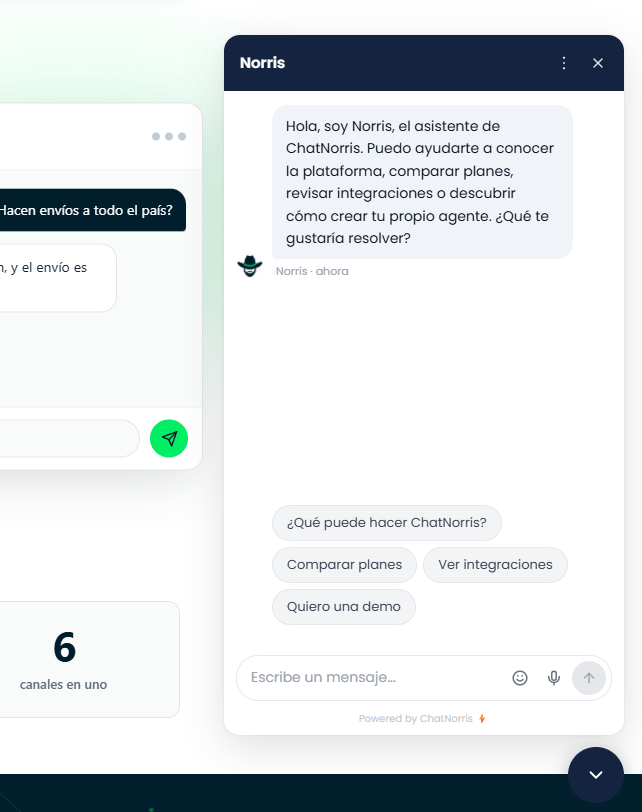
Get the installation code
1
Go to the agent's detail page
In the sidebar, click Agents and then the agent you want to install.
2
Make sure the agent is published
The widget only works with agents in Published status. If it’s in Draft, click Publish first.
3
Copy the installation snippet
In 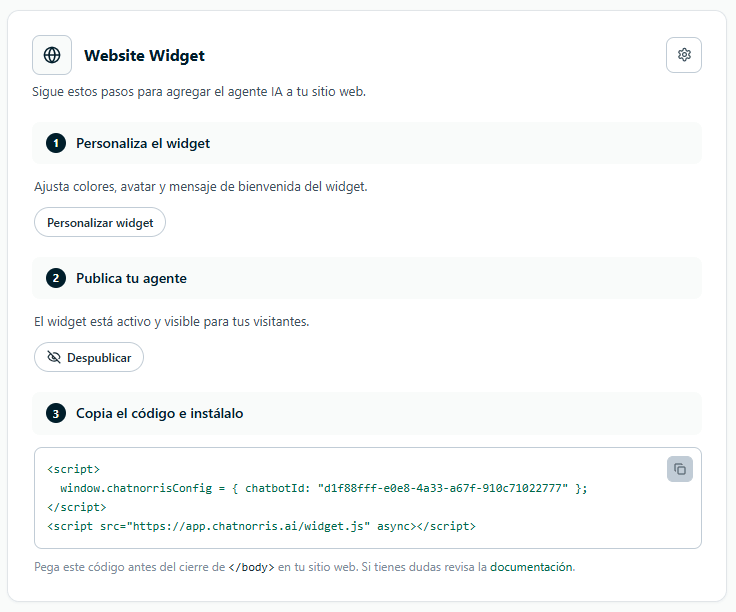
My agents → [your agent] → Deploy, copy the code from the summary bar or open Web to see the full installation page (installation and inactivity close; the language is changed from Customize).Paste the code on your site
The snippet is two<script> tags that you paste into your website’s HTML, before the closing </body> tag. The first one tells which agent to load and the second one loads the widget:
- Static HTML
- WordPress
- Webflow
- Shopify
- Wix
- Squarespace
- Google Tag Manager
Open your site’s HTML file and paste the snippet before
</body>.Set up lead capture (Lead Form)
The lead form isn’t configured from the widget installation: it’s an agent Action. It’s configured fromMy agents → [your agent] → Actions → Lead Form, where you can define whether it’s required, which fields to ask for, when it should be shown and the form’s texts.
When it’s on, the widget shows a form with the fields you define before the visitor can type (or during the conversation, depending on the chosen criteria). The details are automatically recorded in the Leads section.
See the full guide in Agent actions → Lead Form.
The lead form is optional. If it’s off, the visitor can chat without giving their details.
Frequently asked questions
Does the widget work on mobile?
Does the widget work on mobile?
Yes, the widget is designed to work on mobile and desktop devices.
Can I install the widget on more than one site?
Can I install the widget on more than one site?
Yes. The same snippet can be used on multiple sites. The agent will reply the same way on all of them.
Does the widget affect my site's speed?
Does the widget affect my site's speed?
The script loads asynchronously and doesn’t block your page from loading.
Can I customize how the widget looks?
Can I customize how the widget looks?
Yes. From
My agents → [your agent] → Customize you adjust the widget’s colors, logo, avatar, position, texts and behavior, without reinstalling the code. See Customize the widget.