

Internal notes
Internal notes are messages for your team inside a conversation: use them to leave context (“I already offered them a discount”), ask for help or let a teammate know something before they reply. They stay in the thread, between the messages, and are never sent to the visitor on any channel. The AI agent doesn’t receive them either.Write a note
- Open the conversation in Conversations.
- In the composer, choose Internal note above the editor. If the conversation is waiting for a person, the AI is replying, it belongs to another team or it’s closed, use the Internal note button on the notice: you don’t need to take it.
- Write the note. The editor turns yellow and says Only your team sees it so you don’t confuse it with a reply.
- Press Enter or Save note.
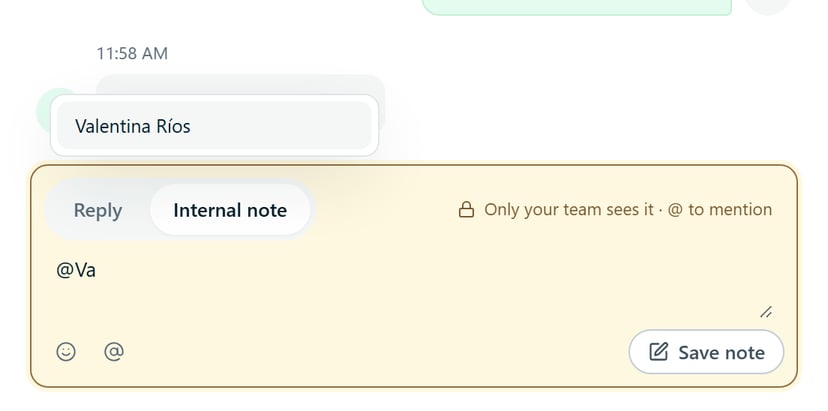
Mention someone
Type@ (or use the Mention a teammate button) and pick the person from the list; you can keep typing their name to filter. Only people who can handle that agent appear. A note can mention up to 10 people.
Each person mentioned gets a bell notification, “mentioned you”, that takes them to the conversation. Whoever writes the note doesn’t get a notification for mentioning themselves.
Who sees and who deletes notes
- Who sees them: everyone on the team who has access to the conversation, including that agent’s Operators and people who aren’t in the assigned team.
- Who deletes them: whoever wrote the note or an Owner or Admin, with the trash icon next to the note. Deleting is permanent.
- In ChatNorris Inbox, the mobile view, notes can be seen but not written.
What they don’t include
- They aren’t sent to the visitor or to the AI agent.
- They don’t appear in the widget, in the API or in the inbox preview.
- They aren’t included when you export a conversation.
- Deleting a conversation also deletes its notes.
Conversations
All the zones of the Conversations screen: inbox, thread, composer and details panel.